Node A Godot scene is a tree of typed Nodes; there is no empty container you bolt components onto.
Prefab
Blueprint Class
PackedScene (.tscn) A saved scene is Godot's prefab: instance it at runtime or drop it into another scene.
Component (MonoBehaviour)
Actor Component
Child Node Composition happens by adding typed child nodes to the tree, not by attaching components to a container object.
Transform
Transform / SceneComponent
Node2D / Node3D position, rotation, scale Node2D and Node3D each carry position, rotation, and scale directly — there is no separate Transform component to fetch first.
Empty GameObject
Empty Actor / Scene Component
Node / Marker2D / Marker3D Use a bare Node for a non-visual container, or Marker2D/Marker3D when you also want the editor gizmo for a reference point.
Lifecycle
Unity
Unreal
Godot
Update()
Event Tick
_process(delta) Per-frame logic; use _physics_process for physics-step logic.
Awake()
Constructor
_init() _init() runs when the object is constructed, before it enters the scene tree — child nodes and @onready vars aren't ready yet.
Start()
BeginPlay
_ready() _ready() fires once a node and all its children have entered the scene tree — the right place for @onready-dependent setup.
FixedUpdate()
Tick (substepped) / TickComponent
_physics_process(delta) Runs on the fixed physics tick — put movement, collision, and RigidBody-adjacent code here instead of _process.
OnDestroy()
EndPlay
_exit_tree() Fires when the node is removed from the scene tree — the place to disconnect signals or release external resources.
OnEnable() / OnDisable()
SetActorHiddenInGame / SetActorTickEnabled
tree_entered / tree_exiting / visibility_changed There's no direct enable/disable callback pair; hook tree_entered/tree_exiting for lifecycle, or visibility_changed for show/hide-driven logic.
await / SceneTreeTimer await a signal or a scene-tree timer instead of an IEnumerator coroutine.
UnityEvent / C# event
Event Dispatcher
signal Declare a signal, emit it, and connect listeners — no manual unsubscribe needed.
MonoBehaviour
AActor / UActorComponent base class
A script attached to a typed Node There's no universal base behavior class — any GDScript file that extends a Node subclass becomes that node's behavior.
Instantiate()
SpawnActor
PackedScene.instantiate() Load or @export a PackedScene, call instantiate(), then add_child() it into the tree.
Destroy()
DestroyActor / K2_DestroyActor
queue_free() queue_free() frees the node at the end of the current frame; use free() only when you need it gone immediately and know it's safe.
SendMessage()
Event Dispatcher / Interface Call
signal.emit() or a direct method call SendMessage's stringly-typed broadcast has no direct match — prefer a declared signal, or call a method directly if you hold a reference.
Invoke() / InvokeRepeating()
Set Timer by Function Name
SceneTreeTimer / Timer node One-shot delayed calls use get_tree().create_timer(...).timeout; recurring calls use a Timer node with autostart and wait_time.
[SerializeField]
UPROPERTY(EditAnywhere)
@export @export exposes a typed variable to the Inspector and to scene/resource serialization.
static class (Singleton pattern)
Game Instance / UGameInstanceSubsystem
Autoload singleton Register a script as an Autoload (Project Settings) and it becomes a globally-accessible node singleton — no static-field workaround needed.
Physics
Unity
Unreal
Godot
Rigidbody / Rigidbody2D
UPrimitiveComponent (Simulate Physics)
RigidBody2D / RigidBody3D Full physics-simulated bodies; apply forces/impulses instead of setting position directly.
AnimationTree An Anim Blueprint's event graph plus state machine maps to an AnimationTree paired with a regular GDScript for logic.
Assets & Resources
Unity
Unreal
Godot
ScriptableObject
Data Asset / DataTable
Resource (.tres) Subclass Resource with @export vars for data-driven, savable assets.
Addressables
—
ResourceLoader.load_threaded_request() Background-load a resource by path, then poll status and fetch it once ready — no addressable asset groups to configure.
Resources.Load()
StaticLoadObject / ConstructorHelpers
preload() / load() preload() resolves at parse time (path must be a literal); load() resolves at runtime, like a dynamic Resources.Load call.
Material (Standard Shader)
Material Instance
StandardMaterial3D StandardMaterial3D exposes the built-in PBR shader's parameters without writing shader code.
—
Material Editor
ShaderMaterial + VisualShader VisualShader gives a node-graph editor like Unreal's Material Editor; ShaderMaterial is what you assign once the graph (or raw shader code) is authored.
Autoload singleton Autoload nodes live outside the current scene and survive scene changes automatically — nothing to mark persistent.
—
Level
Scene (.tscn) A Godot 'scene' can be an entire level, a prefab-like reusable piece, or a single node — Levels map to top-level scenes loaded via change_scene_to_file().
Audio
Unity
Unreal
Godot
AudioSource
Audio Component
AudioStreamPlayer / 2D / 3D Pick the flavor by dimensionality: plain AudioStreamPlayer for UI/music, 2D or 3D for positional sound.
@rpc annotation Annotate a method with @rpc(...) and call it directly — the annotation configures authority, reliability, and call mode.
NetworkVariable<T> / SyncVar
—
MultiplayerSynchronizer List properties in a MultiplayerSynchronizer's replication config instead of wrapping each field in a NetworkVariable type.
NetworkObject.Spawn()
—
MultiplayerSpawner A MultiplayerSpawner watches a parent node and auto-replicates scenes instanced under it to peers.
—
Replication (bReplicates / UPROPERTY(Replicated))
MultiplayerSynchronizer + @rpc Combine a MultiplayerSynchronizer for property replication with @rpc-annotated methods for replicated function calls.
UI
Unity
Unreal
Godot
uGUI Canvas
UMG Widget
Control node + Containers Build UI from Control nodes; a reusable widget is just a saved Control scene, styled with a Theme.
Misc
Unity
Unreal
Godot
Time.timeScale
SetGlobalTimeDilation
get_tree().paused + Node.process_mode Pausing stops _process/_physics_process on pausable nodes; set a node's process_mode to PROCESS_MODE_ALWAYS to keep it running while paused.
Time.deltaTime
DeltaTime (Tick parameter)
the delta parameter _process and _physics_process each receive delta as an argument instead of a global property.
print() print() writes to the Output panel/stdout; print_debug() additionally appends the calling function and line.
PlayerPrefs
SaveGame (USaveGame)
ConfigFile ConfigFile reads/writes simple section/key/value data to disk — a lightweight PlayerPrefs-style store for small settings and save data.
Tag / CompareTag()
Actor Tags
Groups (add_to_group / is_in_group) Groups are Godot's tag system — a node can belong to many groups at once, unlike Unity's single-tag-per-object default.
—
GameMode / Game Mode Base
Autoload singleton There's no built-in GameMode concept; an Autoload script holding rules and state (turn order, win conditions) fills the same role.
—
Enhanced Input (Input Actions / Mapping Contexts)
Input Map (Project Settings) actions Godot's Input Map plays the same role as an Enhanced Input Action plus Mapping Context pair, without a separate context-priority stack.
—
Cast To (Blueprint) / Cast<T>
as / is `as` performs a safe downcast that returns null on failure; `is` just tests the type without casting.
—
UDataTable
Array of Resource instances or Dictionary Model row-based data as an array of custom Resource instances (or a Dictionary keyed by id) instead of a DataTable asset plus row struct.
How Godot works
Ten ideas, side by side
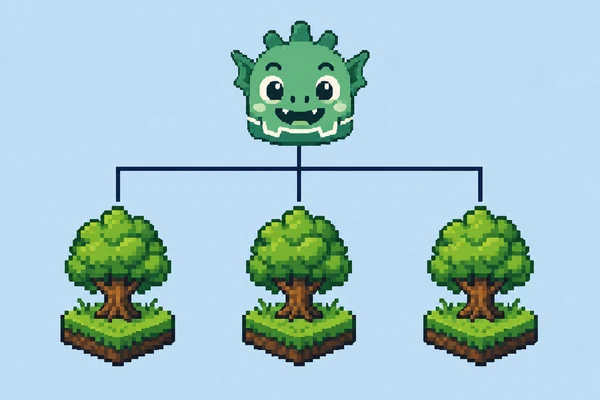
Each card draws one idea the Unity way, the Unreal way and the Godot way, then says in a sentence what changes. The links go to the article that explains it and to the code in the dictionary.
Objects are node trees
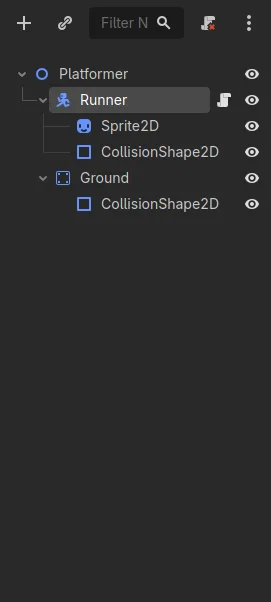
Each component becomes its own child node, and the root node’s type (here CharacterBody2D) decides what the object is.
Each path includes scene-building, code comparisons, small experiments, and steps to try in Godot.
Before you start
What moves, and what you rebuild
A migration is rarely blocked by code. It is blocked by the two or three things
that turn out to have no equivalent, found in month three. This is what carries across a
Unity or Unreal project, using Godot 4.7 as the target. Moves means the file
itself is reusable after a re-import. Rebuilt means the concept maps cleanly
but the asset is authored again. Rewritten means there is no equivalent file
to bring.
Asset
Unity
Unreal
Godot 4.7
Verdict
Models and meshes
FBX, OBJ, .blend
FBX, static and skeletal meshes
glTF 2.0 is the first-class format; FBX needs conversion
Moves
Textures and audio
PNG, TGA, WAV, OGG
PNG, TGA, WAV
PNG, WebP, JPG, WAV, OGG, MP3
Moves
Animation clips
Animator controller
Animation Blueprint
Clips arrive with the model; AnimationPlayer and AnimationTree drive them
Rebuilt
Reusable objects
Prefabs and variants
Blueprint classes
Scenes (.tscn), inherited scenes for variants
Rebuilt
Tuning data
ScriptableObject
Data Asset, Data Table
Resource (.tres) — the closest one-to-one concept
Rebuilt
Gameplay code
C# MonoBehaviour
C++ and Blueprint graphs
GDScript, or C# with Godot APIs
Rewritten
User interface
uGUI or UI Toolkit
UMG widgets
Control nodes with anchors and containers
Rebuilt
Shaders
ShaderLab, Shader Graph
Material graphs, HLSL
Godot shading language or VisualShader
Rewritten
Navigation
NavMesh and agents
Nav Mesh Bounds, AI controllers
NavigationRegion, NavigationAgent nodes
Rebuilt
Store plugins
Asset Store packages
Marketplace plugins
Asset Library add-on, GDExtension, or your own
Check first
Nothing in this table is a converter. Godot has no importer that reads a Unity or
Unreal project; the parts marked Moves move because they were never engine-specific
files in the first place. For term-by-term lookups, the equivalents dictionary covers 61 pairs with code on both sides.
The order that works
Six steps, cheapest failure first
Each step is ordered so that the thing most likely to end the migration is
tested before you spend a month on content. If a step fails, you have lost days rather than a
quarter.
1
Check the exits first
Confirm Godot exports to your target platforms and that every plugin you depend on has an equivalent, a replacement, or a plan. This is the only step that can end the migration, so it goes before any work.
2
Rebuild one character
An empty project, one CharacterBody, movement, and a collision shape. This forces you through the Input Map, the physics tick, and the scene tree in an afternoon rather than a month.
3
Run one art asset end to end
One model with one texture and one animation, from your DCC tool to a scene that plays it. Import settings are where schedules quietly go missing.
4
Rebuild one interaction
A pickup, a signal, and something on screen that changes. This is where prefab and Blueprint habits meet scenes and signals.
5
Rebuild one screen of UI
Anchors and containers behave differently from uGUI and UMG. Find that out on one screen, not forty.
6
Only now move content in bulk
By this point the pipeline, the input layer, the physics assumptions and the UI system are known quantities. Bulk work becomes repetitive instead of risky.
Week one
Three habits that change
Most of the translation is mechanical once these three change. They account for
the majority of "why does this not work" moments in the first week, whichever engine you came
from.
A script is its node
You wroteGetComponent<Rigidbody>() / GetOwner()
You now writeThe script extends the node it sits on. Children come from the tree: @onready var sprite: Sprite2D = $Sprite2D
There is no component lookup because there are no components to look up.
Two update functions, not one
You wroteUpdate() and FixedUpdate() / Tick
You now write_process(delta) for frame work, _physics_process(delta) for anything physical
move_and_slide() already accounts for the physics timestep, so do not multiply velocity by delta before calling it.
Signals replace events and dispatchers
You wroteC# event + listener / Event Dispatcher + binding
You now writesignal collected(value: int), connected in code or in the Node dock
A node announces what happened. Whoever cares connects to it, and nothing needs a reference to the listener.
Each of these is practised with runnable code in the C# to GDScript lab.
Moving an existing project?
Rebuild one room, one character, and one interaction first. Check your target platform and essential plugins before moving the rest.