Prototype Kit
Nine low-poly greybox pieces on a 1 m grid that snap together and paint into a GridMap. The seven solid pieces get collision on import, the coin and the checkpoint stay walk-through, so you can block out a playable 3D level before any art exists.
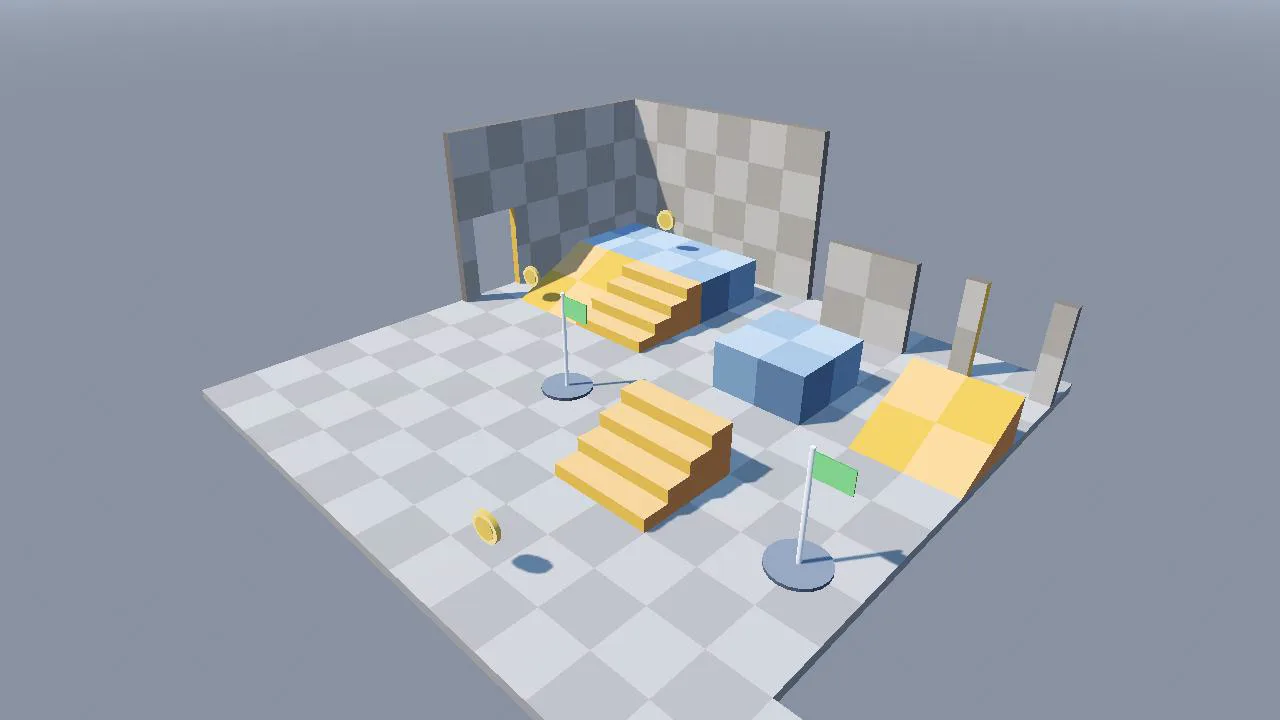
Drop it into your project
- Unzip and copy the whole folder into your project, for example to
res://prototype_kit/, then deleteproject.godotfrom the copy. Godot skips any folder that holds its ownproject.godot, so with it the kit never imports. Keepprototype_kit.glb.import,kit_import.gdandpalette_material.treswith the glb: the import settings, the generated files and the colours depend on them. You can also deletedemo.tscn,demo.gdanddemo.gd.uid. - Let Godot import the folder, then select
prototype_kit.glbin the FileSystem dock and check the Import dock. It should say Import As: Scene, with Nodes > Root Type left empty (a Node3D), Apply Root Scale on with Root Scale 1, and Import Script > Path set tokit_import.gd. The pieces are already in metres, so leave the scale alone. The script path is relative to the glb, so it keeps working in any folder. - Collision needs no setting: the importer reads the suffix at the end of each object name, such as
ramp_2x1-convcol, and adds aStaticBody3Dwith aCollisionShape3D. To see what each piece got, double-click the glb to open Advanced Import Settings and select a piece in its scene tree, or run the game with Debug > Visible Collision Shapes on. - To place pieces by hand, drag scenes from
pieces/into your level. Turn on Use Snap in the 3D viewport toolbar (or press Y) and open Transform > Configure Snap... to check that Translate Snap is 1. With snap on, a dropped piece lands with its origin on a grid point and the move gizmo moves it in whole metres, and since every origin sits on a grid point, it lines up exactly with its neighbours. Turn walls and ramps in 90° steps: with snap on, rotation moves in Rotate Snap steps, 15° by default, or you can type the angle in the Inspector. - To paint pieces instead, add a
GridMapnode and dragprototype_kit_library.tresinto its Mesh Library slot. Set Cell > Size to (1, 1, 1) and turn off Center X, Center Y and Center Z, so each piece's origin lands on the corner of a cell, the same grid point snapping uses. A 2 m piece then covers four cells, so paint the next one two cells along. Painted cells get the pieces' collision. - Give the level a
WorldEnvironmentand aDirectionalLight3D. The palette colours are flat, so the sun's angle is what makes the faces of a box read as different shades.
Contents
| Piece | Size |
|---|---|
floor_4x4 | 4 × 4 × 0.2 m. Origin at the centre of the top face, so the walking surface is y = 0. Convex box collision. |
floor_2x2 | 2 × 2 × 0.2 m. Same origin as floor_4x4. Convex box collision. |
platform_2x2 | 2 × 2 × 1 m. Origin at the centre of the bottom face; the top is at y = 1. Convex box collision. |
ramp_2x1 | 2 × 2 × 1 m: rises 1 m over 2 m towards -z, a 26.6° slope. Origin at the centre of the bottom face. Convex wedge collision. |
stairs_2x1 | 2 × 2 × 1 m: four steps, 0.25 m high and 0.5 m deep, rising towards -z. Origin at the centre of the bottom face. Collision is the same wedge as the ramp. |
wall_2x2 | 2 × 0.2 × 2 m (width × depth × height). Origin at the bottom of the back face, centred along the length; the 0.2 m thickness goes towards +z. Convex box collision. |
doorway_2x2 | 2 × 0.2 × 2 m with a 1.2 m wide opening the full height. Same origin as the wall. Stack a wall_2x2 on top for a lintel. Trimesh collision. |
coin | 0.5 × 0.104 × 0.5 m, an upright disc. Origin at its centre, so it spins in place. No collision. |
checkpoint | 1.14 × 1 × 2 m: a pad 1 m across, a 2 m pole and a flag. Origin at the bottom centre of the pad. No collision. |
How it works
A greybox kit is a set of plain shapes you build a level from before you make or buy any art. Everything here follows three rules: sizes in whole metres on a 1 m grid, an origin on a grid point for every piece, and one material for everything. The rest of this section explains why each rule is there, how the names in the glb become physics bodies in Godot, and how the kit stays usable when you change it.
Block out first, art later
Level layout decides how a game plays: how far a jump is, whether a corridor is wide enough for the camera, where the player can see the goal from. Those questions are cheap to answer with grey boxes and expensive to answer after a week of modelling. Greybox pieces are deliberately dull so you judge the space, not the look. The checker on every large face is in 1 m squares, so you can count distances straight off the floor and the walls.
A 1 m grid and origins on grid points
Snapping moves a node's origin, not its edges. If two pieces have their origins in different places relative to their shapes, snapping both to the grid still leaves gaps or overlaps. So every piece here puts its origin on a grid point that makes sense for it, and every size is a whole number of metres: a 2 m piece with its origin in the middle has its edges 1 m either side, which is again on the grid.
- Floors: the centre of the top face, so the floor's top is at y = 0 and everything else stands on y = 0.
- Platform, ramp, stairs, checkpoint: the centre of the bottom face, so they stand on whatever y you snap them to.
- Wall and doorway: the bottom of the back face, centred along the length. The thickness goes inwards from the grid line, so the outside of a room is flush with the floor's edge and two walls meeting at a corner close it with no gap.
- Coin: its centre, so
rotate_y()spins it in place.
Heights follow the same grid. The ramp, the stairs and the platform are all 1 m tall, so a ramp or a flight of stairs leads exactly onto a platform. Walls are 2 m tall, so a second wall snapped at y = 2 stacks cleanly, and a wall stacked on a doorway becomes its lintel. The demo's corner room is built that way.
How a name turns into a physics body
Godot's scene importer looks at the end of each node name for a suffix and changes what it builds. The kit's objects are named like this in Blender, and the glTF exporter writes the object names as node names:
floor_4x4-convcol        -> MeshInstance3D "floor_4x4" + StaticBody3D child, ConvexPolygonShape3D (8 points)
ramp_2x1-convcol         -> MeshInstance3D "ramp_2x1" + StaticBody3D child, ConvexPolygonShape3D (6 points)
doorway_2x2-col          -> MeshInstance3D "doorway_2x2" + StaticBody3D child, ConcavePolygonShape3D (32 triangles)
stairs_2x1               -> MeshInstance3D "stairs_2x1", no collision of its own
  stairs_2x1_collider-convcolonly -> StaticBody3D "stairs_2x1_collider", mesh removed
coin, checkpoint         -> MeshInstance3D only
That is the tree Godot 4.7 built from the shipped glb. -col adds a static body with a trimesh shape made from every triangle of the mesh: exact, and the slowest kind of shape to test against. -convcol adds a convex hull of the mesh instead, which is cheaper and exact for anything already convex, such as a box or a wedge. -colonly and -convcolonly do the same but delete the visible mesh, which is how you ship an invisible collider. The suffix is removed from the node name.
Pick by shape. A hull wraps the outside, so it fills any hole: the doorway is the one piece that needs -col, because a hull of its two posts is a solid wall. The coin and the checkpoint have no suffix on purpose. A static body on a coin would stop the player like a wall, so a pickup needs an Area3D of your own, described in the questions below.
Why the stairs collide like a ramp
CharacterBody3D has no step-up feature. move_and_slide() sorts what it hits into floor, wall or ceiling by the angle of the surface, with floor_max_angle at 45° by default. The front of a step is vertical, so it is a wall. The bottom of a capsule is rounded, though, so a very low edge meets it at a shallow angle and counts as floor. With the lesson's capsule (radius 0.4 m, walking at 5 m/s) the edge of a box 0.12 m high was climbed and 0.13 m stopped it, in both Godot Physics and Jolt. The kit's steps are 0.25 m. With collision made from the steps themselves, the capsule stopped dead at the first one.
So the stairs carry a hidden child, stairs_2x1_collider-convcolonly: the same wedge as the ramp, from the bottom of the first riser to the top of the last tread. It touches the back of every tread and stays inside the steps, so you never see it. The slope is 26.6°, well under 45°, and the capsule walked up it at the same speed as up the ramp and reached the 1 m top. The price is that feet sink up to 0.25 m into the front edge of each step. For a greybox that is the right trade.
One palette, one material
All nine pieces share a 64 x 64 texture split into 8 x 8 cells of flat colour. Every face has all of its UVs on the centre of one cell, so the face is that one colour. The material uses nearest filtering and the PNG imports without mipmaps, so a face never picks up its neighbour's colour, even at a distance or on a face edge. The faces are flat shaded on purpose: a greybox is boxes, and smooth normals on a box make its edges look soft and its sides lit wrong. Only the round parts, the coin's rim and the checkpoint's pole, are smooth.
One material also saves draw calls. In a test with the demo's 16-cell corner room, Forward+ drew the 16 piece scenes in 5 draw calls, because it merges copies of the same mesh with the same material. When every piece got its own copy of the material, it took 16. Mobile and Compatibility do not merge them and took 16 either way, while the same room as a GridMap took 5 on all three renderers, because a GridMap draws all the cells of one item in a block together. For large areas on phones or the web, paint with the GridMap.
Piece scenes and a MeshLibrary from one glb
Dragging the whole glb into a level gives you every piece at once, which is not what you want. So the glb's import settings name an import script, kit_import.gd, which extends EditorScenePostImport. Its _post_import() runs after every import, after the suffixes have made the bodies. It saves each top-level piece as pieces/<name>.tscn, moved to the origin, and builds prototype_kit_library.tres with MeshLibrary.create_item(), set_item_mesh() and set_item_shapes(), taking the shapes from each piece's static body:
library.create_item(id)
library.set_item_name(id, piece_name)
library.set_item_mesh(id, source.mesh)
library.set_item_mesh_transform(id, piece_basis)
# a flat array: shape, its transform, shape, its transform...
library.set_item_shapes(id, shapes)
Item IDs come from a fixed table in the script, because a GridMap stores the ID in each cell and must find the same piece after the next import. The script also keeps the files identical when the glb has not changed: deleting the .godot folder and importing again rewrote all ten files byte for byte.
Replacing pieces later
Your levels hold references to pieces/ramp_2x1.tscn or to item 3 of the MeshLibrary, never to the glb's insides. Change the glb in Blender, keep the object names, export over the old file, and on the next import every level shows the new shapes. To change one piece without touching the kit, right-click its scene in the FileSystem dock and choose New Inherited Scene: you can add nodes and change properties there, and it still follows the original when the glb changes. Do not edit pieces/*.tscn or prototype_kit_library.tres directly: kit_import.gd writes both again on every import of the glb, which also happens on a fresh clone, after you delete .godot/ and when a Godot upgrade reimports your assets, and your edits are gone. To keep hand edits instead, clear Import Script > Path in the glb's import settings; the kit keeps working, because the pieces and the library hold their own copies of the meshes. Colours live in palette.png, which palette_material.tres points to; the importer is told to use that external material, so editing either one never gets overwritten.
How it builds on the first 3D scene lesson
The first 3D scene lesson builds its floor by hand: a StaticBody3D with a 12 x 0.5 x 12 BoxMesh and a matching BoxShape3D, placed so its top sits at Y = 0, and a capsule player with a 0.4 m radius, 1.8 m tall. The kit's floors follow the same rule, top at y = 0, and nine floor_4x4 pieces make the same 12 m room. Every walking test on this page used the lesson's capsule and its numbers: 5 m/s, gravity 18. Its jump of 5 m/s peaks at 5² / (2 × 18) = 0.69 m, so the player cannot jump onto the 1 m platform and needs the ramp or the stairs, a good first design problem. The lesson's last step asks you to duplicate the floor and resize it into a raised platform; these pieces are that step, already built.
Pitfalls and renderer notes
- The pieces arrive the wrong size. Blender's glTF exporter writes Blender units as metres and ignored the scene's Unit Scale in a test: with Unit Scale 0.01, a cube Blender showed as 2 cm arrived in Godot 2 m wide. Model in Blender units as metres. A scale left on an object is a second trap: a 1 m cube with object scale 2 arrived as a 1 m mesh on a node with scale 2, and Godot's own Import As: Mesh Library, which keeps meshes only, turned it into a 1 m item. Apply scale in Blender (Ctrl+A > Scale) before you export. To resize a whole glb, use Root Scale in the Import dock with Apply Root Scale on.
- Collision is not generated. Check the spelling first: an object named
typo-collgot no body, and the giveaway is that the node in Godot still has the suffix in its name, because Godot removes only suffixes it recognises. Then check where the suffix is. Godot reads the node name, which is the Blender object name.-coland-convcolalso work on the mesh data name as a fallback, but-colonlyon a mesh data name was ignored in a test and the box stayed visible with no body. Put suffixes on object names. - A convex suffix on a shape with a hole fills the hole. The doorway with a convex hull instead of its trimesh became a solid 2 m wall: the test capsule stopped in front of it, while with the shipped trimesh it walked straight through the 1.2 m opening. Use
-colfor anything with an opening or a hollow, and-convcolfor boxes and wedges. - The player cannot climb stairs.
CharacterBody3Dhas no step height setting. With the lesson's capsule (radius 0.4 m), edges up to 0.12 m were climbed and 0.13 m stopped it, in both Godot Physics and Jolt, and the trimesh of the kit's 0.25 m steps stopped it at the first step. The kit's stairs use a ramp-shaped collider, which the capsule walked up to the top. If you make your own stairs, give them the same kind of hidden wedge, or write a step-up routine for your controller. - Two floors overlap. In tests with two floors at the same height, one turned 90°, and one raised 1 mm, seen from close up and from 30 m in Forward+ and Compatibility, there was no flicker: Godot drew one of them cleanly on top. What you do get is a checker that no longer lines up in 1 m squares and two colliders stacked in one place. Snap floors edge to edge, and use
platform_2x2for raised ground rather than a second floor on top of the first. - Edits disappear after a re-import. Godot rebuilds an imported scene from the glb each time it changes, and the import script rebuilds
pieces/*.tscnandprototype_kit_library.treson every import, so anything you change directly in those files is lost. Make changes in an inherited scene (New Inherited Scene in the FileSystem dock's right-click menu), or in your own scene that instances a piece. Material changes belong inpalette_material.tres: the import settings only point at it, and in a test a re-import left an edited copy untouched. - GridMap cells have no collision, or pieces float half a cell up. A MeshLibrary only carries collision that is attached to each item. Godot's editor export, Scene > Export As... > MeshLibrary, takes it from a
StaticBody3DwithCollisionShape3Dchildren under each mesh, and the Import As: Mesh Library option in the Import dock takes none at all: the kit's glb imported that way gave nine items and zero shapes. Use the kit'sprototype_kit_library.tres, which has the shapes. Also change the GridMap's cell settings: the defaults are a 2 m cell with centring on, which put cell (0, 0, 0) at (1, 1, 1), so a floor painted on level 0 had its top 1 m above the ground. - A piece pushed against the inside of a wall overlaps it by 0.2 m. Walls take their thickness from the grid line inwards, which closes the corners of a room, but it means the room is 0.2 m smaller on each walled side than the floor under it. Leave a cell free along walls, as the demo's ledge does, or accept the overlap where it is hidden.
The demo scene was run under Forward+, Mobile and Compatibility with no errors or warnings, and the kit itself looks the same on all three: flat palette colours, no shaders. Mobile matched Forward+ to within 1 of 255 on average. One thing differs, and it comes from the renderer, not the kit: Compatibility draws a light that casts shadows in an extra pass, which Godot's renderer comparison lists as "less accurate blending". With the demo's sun casting shadows, every sunlit face turned pure white under Compatibility (a wall that is 170 grey in Forward+ read 255), so the demo switches the sun's shadows off when it runs under Compatibility. The same wall then reads 181. If you ship a web build, which uses Compatibility, check your lighting there.
Pairs with
FPS Controller
A first-person CharacterBody3D for Godot 4.7 with mouse look, sprint, crouch with a ceiling check, coyote time and jump buffering. It brings its own input actions and 54 behaviour tests that prove each feature.
- Godot 4.7
- CC0
Learn the idea behind it
- Your First Godot 3D Scene: Movement, a Camera, and a Playable Room
- How Godot imports glTF models The full import pipeline: materials, scale, collisions and reimport settings.
Questions
Can I use these Godot 3D assets in a commercial game?
Yes. The whole kit, including the glb, the palette, the scripts and the scenes, is released under CC0 1.0, which places it in the public domain. You can use it, change it and sell games made with it without asking or giving credit. Credit to godotlearning.com is welcome but not required. LICENSE.txt in the zip has the full legal text.
How do I make stairs walkable for a CharacterBody3D in Godot?
Give the stairs a sloped collider instead of collision on each step. CharacterBody3D has no step-up, so the vertical front of a step counts as a wall: a capsule with a 0.4 m radius climbed edges up to 0.12 m and stopped at 0.13 m. A hidden wedge from the bottom of the first step to the top of the last one turns the stairs into a ramp for physics. Name it with -convcolonly in Blender and Godot builds it as an invisible static body, which is what this kit's stairs_2x1 does.
How do I change the colours of the kit?
Edit palette.png. Each face of every piece takes its colour from the centre of one 8 x 8 px cell, so painting a cell a new colour changes every face that uses it, across all pieces and every level at once. The floors use the third and fourth cells of the top row, the walls the third and fourth cells of the fifth row. For a piece of its own colour, make an inherited scene of it and give its MeshInstance3D a Material Override.
How do I turn the coin into a pickup?
Make a new scene with an Area3D as the root, instance pieces/coin.tscn under it, and add a CollisionShape3D with a SphereShape3D of radius 0.25. Connect the area's body_entered signal to a function that adds to the score and calls queue_free(). The kit's coin has no collision of its own, so it never blocks the player, and its origin is its centre, so rotate_y() in _process() spins it in place.